Essential Observing Skills
Owning a telescope doesn’t make you an astronomer. Knowing how to use it does. A lot of beginners assume that once they have equipment, observing is automatic - point the telescope at the sky, look through the eyepiece, and see amazing things. It doesn’t work that way. There are skills involved, and most of them aren’t obvious until you’ve already fumbled through a few frustrating sessions.
How do you actually aim a telescope at something you can’t see yet? How do you know if an object is out of focus or just genuinely fuzzy? Why does everything keep drifting out of view? How do you see faint galaxies that other people claim are “right there” when all you see is blank sky?
These aren’t equipment problems. They’re skills you need to develop. And the good news is that none of them are particularly hard - you just need to know what you’re doing and practice a bit. This chapter covers the practical techniques that separate someone who owns a telescope from someone who actually uses one effectively. We’ll talk about finder scopes, star-hopping, focusing, tracking, using averted vision, reading observing conditions, and working in the dark without ruining your night vision or tripping over your equipment.
Some of this will feel awkward at first. Your first attempts at star-hopping will be slow and frustrating. You’ll lose objects in the eyepiece. You’ll struggle to focus. You’ll wonder why other observers make it look so easy. That’s normal. These are skills, and like any skill, they improve with practice. By your tenth observing session, things that felt impossible during your first session will become second nature.
The goal isn’t perfection. The goal is competence - being able to find what you’re looking for, get it in focus, and keep it centered long enough to actually observe it. Everything else builds from there. Let’s start with the basics.
Using Your Hand to Navigate Star Charts
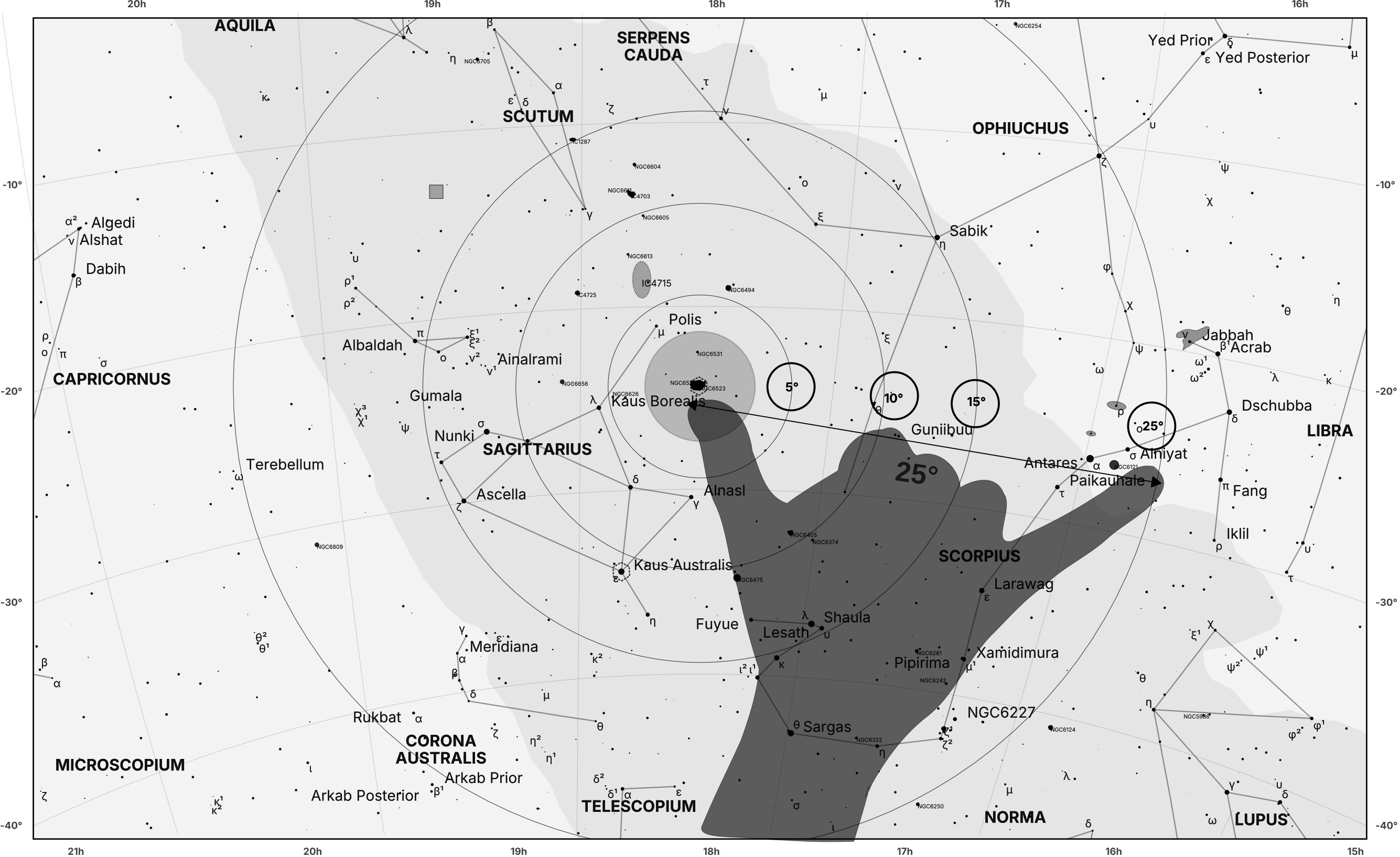
Every star chart in this book includes degree markers - circles showing 5°, 10°, 15°, and 25° radii from the target object. These circles work directly with the hand measurement overlay shown on each chart. Look at the Sagittarius chart. You’ll see a hand overlay with a 25° measurement. That hand represents your actual hand held at arm’s length in the sky - and the 25° span shows you exactly how much sky your hand covers when measuring between two points.
This visual reference makes it easy to judge distances. You can see at a glance that moving from one bright star to another might be “about one hand-width” or “two hand-widths” just by comparing the distance on the chart to the hand overlay.
Reading the Circles with Your Hand
Refer to the previous chapter “The Language of the Sky” section “Using Your Hand to Measure Angles” for a refresher on angular measurements and how degrees translate to hand measurements. Here’s how the circles translate to hand measurements:
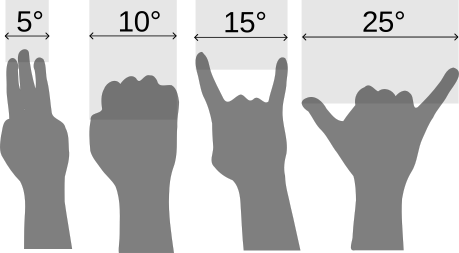
- 5° circle = about 3 fingers width, or half a fist
- 10° circle = about one fist-width
- 15° circle = about the width between the index finger and the pinky, or one-and-a-half fists
- 25° circle = about one full hand-span (thumb to pinky stretched) or two-and-a-half fists
The hand overlay visually confirms the 25° measurement. If you’re navigating from a star near the edge of the 25° circle, you’re looking at one full hand-span away from your target.
Why Hand Measurements Matter
The hand gives you an instant visual reference. Instead of trying to mentally convert “25 degrees” into something meaningful, you see the hand on the chart and think “oh, that’s how far my hand spans in this region of sky.” It makes distance estimation intuitive. You’re not doing math. You’re comparing the space between stars on the chart to the hand, then replicating that measurement in the real sky with your actual hand.
Tips for Success
The approximations assume you are using your hand at arm’s length. Stretch your arm out fully, hold your hand steady, and use it to gauge distances in the sky.
Compare, don’t calculate. Don’t measure every distance precisely. Just eyeball it: “That looks like half a hand-span” or “That’s about two fists.” Close enough is fine.
Use the hand measurement to judge if an anchor is practical. If your only bright star is two full hand-spans away from the target, that’s a long hop. Find a closer anchor or break the journey into steps.
Mentally orient the chart to match the sky. The hand measurement works regardless of orientation, but matching north on the chart to north in the sky makes everything easier.
Remember: your hand is always the right size. Even though people have different hand sizes, the ratio between hand size and arm length stays roughly constant. Your measurements will be close enough.
Bottom Line
The distance circles overlay on each chart is there to make distance estimation effortless. Glance at the chart, see how far your anchor is from your target relative to the hand icon, then replicate that measurement in the sky. Combined with the hand approximations, you have both visual (the hand) and numerical (5°, 10°, etc.) references. Use whichever works better for your brain. Stop guessing. Start measuring. Your hand and these charts work together to make navigation straightforward.
Using a Finder Scope or Red-Dot Finder
Your telescope’s main eyepiece shows a tiny slice of sky - often less than one degree, sometimes just a fraction of a degree. Trying to aim the telescope by looking through the main eyepiece is like trying to navigate a city by staring through a drinking straw. You need a wider view to figure out where you’re pointing.
That’s what finders are for. A finder scope is a small, low-power telescope mounted on your main telescope. A red-dot finder projects a red dot or circle onto a clear window. Both serve the same purpose: they give you a wide field of view so you can aim the telescope accurately before looking through the main eyepiece. Using a finder effectively is one of the most important skills in observing. Get this right, and finding objects becomes straightforward. Skip it, and you’ll spend your nights waving the telescope around hoping to stumble onto something.
Types of Finders
Finder scopes are miniature telescopes, typically 6x30, 8x50, or 9x50 (the first number is magnification, the second is aperture in millimeters). They show a magnified view with crosshairs in the center. You center an object on the crosshairs, and it should appear in your main telescope’s eyepiece.
Red-dot finders (also called reflex finders) project a red LED dot or circle onto a clear window. You look through the window with both eyes open, see the sky directly, and position the red dot over your target. No magnification, no crosshairs - just a simple aiming reticle superimposed on the real sky.
Both work. Finder scopes show fainter stars, which helps with star-hopping in dim star fields. Red-dot finders are faster and more intuitive for bright targets like planets and the Moon. Many observers use both - a red-dot for initial rough aiming and a finder scope for precise centering on faint objects.
Aligning Your Finder
Before you can use a finder, you have to align it with the main telescope. This means adjusting the finder so that when you center an object in the finder’s crosshairs (or under the red dot), it appears centered in the main telescope’s eyepiece. Most finders have three adjustment screws around the mounting bracket. Loosening one screw and tightening the opposite one tilts the finder in that direction.
Here’s how to align:
Step 1: Set up during the day or early evening when you can see distant objects clearly. Don’t wait until full darkness - aligning in the dark is frustrating.
Step 2: Point the main telescope at something far away and distinctive - a distant tree, a chimney, a streetlight, a bright star. Use your lowest-power eyepiece in the main telescope. Center the object in the main eyepiece.
Step 3: Look through the finder (or at the red-dot window). The object probably won’t be centered on the crosshairs or red dot. It might not even be in the field of view.
Step 4: Adjust the finder’s screws to move the crosshairs (or red dot) toward the object without moving the telescope itself. Make small adjustments - a little goes a long way.
Step 5: Check the main eyepiece to make sure the object is still centered there. If it drifted, recenter it and go back to step 4.
Step 6: Repeat until the object is centered in both the finder and the main eyepiece. Once aligned, the finder should stay aligned unless you bump it or jostle the telescope during transport.
This takes 5-10 minutes the first time. After that, you’ll only need to realign if something gets knocked out of position.
Aiming Efficiently
Once your finder is aligned, here’s the workflow for finding an object:
Step 1: Roughly aim the telescope by sighting along the tube or using the finder’s general direction. Get the telescope pointing in approximately the right area of sky. Step 2: Look through the finder and move the telescope until your target (or a nearby bright star) is centered on the crosshairs or under the red dot.
Step 3: Now look through the main eyepiece. The object should be in the field of view, probably close to centered.
Step 4: Fine-tune by nudging the telescope until the object is perfectly centered.
Don’t skip step 2. A lot of beginners look through the main eyepiece immediately, see nothing but blank sky, and spend 10 minutes randomly sweeping around hoping to find their target. Use the finder first. That’s what it’s for.
Using Both Eyes Open
Here’s a trick that makes finders - especially red-dot finders - far easier to use: keep both eyes open. Your brain is good at merging two different views. One eye looks through the finder (or at the red-dot window), the other eye looks at the sky directly. Your brain overlays the two images, and you see the red dot (or finder view) superimposed on the real sky. This takes a few seconds to get used to, but once it clicks, aiming becomes effortless. You see the sky, you see the reticle, and you move the telescope until the reticle sits on your target.
With finder scopes, this is slightly harder because the finder shows a magnified view, but it still works. With red-dot finders, it’s intuitive - the window shows the unmagnified sky, so your brain merges it seamlessly. If you can’t get both eyes to cooperate, squint or close one eye. But try the both-eyes-open method first. Most people find it easier once they practice.
Finder vs Main Scope Workflow
The finder is for aiming. The main scope is for observing. Don’t confuse the two.
Here’s the typical sequence:
- Use a star chart or app to figure out where your target is located.
- Aim the telescope roughly in that direction.
- Use the finder to center a nearby bright star or the target itself (if it’s bright enough to see in the finder).
- Look through the main eyepiece. Your target should be visible.
- Fine-tune centering in the main eyepiece using the telescope’s movement controls.
For bright objects like planets or the Moon, you’ll see them directly in the finder. Center them, switch to the main eyepiece, done.
For faint objects like galaxies or nebulae, you often can’t see them in the finder. Instead, you use the finder to aim at a nearby bright star, then star-hop from that star to the target (we’ll cover star-hopping in the next section). The finder gets you to the right neighborhood. The main eyepiece gets you to the exact address.
Common Mistakes
Not aligning the finder. If your finder isn’t aligned, everything downstream becomes harder. Take the time to align it properly.
Forgetting to check alignment after transport. Bumps and vibrations during transport can knock a finder out of alignment. Check it at the start of each session, especially if you’ve moved the telescope.
Trying to find faint objects without using the finder. The main eyepiece shows too narrow a field. You’ll waste time sweeping around blindly. Start with the finder, always.
Using too much magnification in the main scope when searching. Start with your lowest-power eyepiece (widest field of view). Once you’ve found the object, you can increase magnification. Searching at high power is like searching for a house by looking through a keyhole.
The Bottom Line
The finder is the most underrated piece of equipment on your telescope. It’s not glamorous. It doesn’t gather light or show detail. But it’s the difference between finding objects in seconds and wandering around lost for 20 minutes. Align it properly. Use it every time. Keep both eyes open if you can. Follow the workflow: finder first, main eyepiece second.
Get comfortable with your finder, and everything else in observing becomes easier.
Star-Hopping
Most deep-sky objects are invisible to the naked eye. You can’t just look up, spot a galaxy, and point your telescope at it. Galaxies, nebulae, and faint star clusters require a technique called star-hopping - using bright, visible stars as stepping stones to navigate to your target.
Star-hopping is like following directions: “Start at the mall, drive three 3 kms east, turn left at the red building, and the house is two gates down on the right.” Except instead of streets, you’re using stars. And instead of buildings, you’re using star patterns. It sounds complicated. It’s not. Once you understand the basic workflow and practice a few times, star-hopping becomes second nature.
The Basic Concept
Here’s how star-hopping works:
- Find a bright star near your target - something you can see with the naked eye or easily locate in your finder.
- Center that star in your telescope’s eyepiece.
- Look at your star chart to see the pattern of stars between your bright anchor star and your target.
- Move the telescope in small steps, following the pattern, until you reach your target.
You’re not making one big jump from a random spot in the sky to your target. You’re making several small hops, using visible stars as guideposts along the way.
Using Bright Stars as Anchors
Every star-hop starts with an anchor star - a bright, easily identifiable reference point.
The best anchor stars are:
- Bright enough to see with the naked eye - magnitude 3 or brighter is ideal
- Close to your target - within a few degrees if possible
- Easy to identify - part of a recognizable constellation or asterism
For example, if you’re hunting the Andromeda Galaxy (M31), your anchor star might be Mirach (Beta Andromedae), a magnitude 2 star in Andromeda. If you’re looking for the Ring Nebula (M57) in Lyra, your anchor is Vega, one of the brightest stars in the summer sky.
Star charts and apps often suggest anchor stars for popular targets. Look for notations like “Start at Vega” or “Begin at Alkaid in the Big Dipper’s handle.”
Once you’ve identified your anchor star, center it in your finder scope, then switch to your main eyepiece. The anchor star should be centered there too. Now you’re ready to hop.
Matching Finder View to Star Charts
Here’s where beginners get confused: the view through your finder or eyepiece might not match the orientation of your star chart. Star charts are printed with north at the top and east to the left (opposite of geographic maps, because you’re looking up at the sky, not down at the ground). But your telescope might flip the image, rotate it, or mirror it depending on the optical design:
- Refractors with a star diagonal: flip the image upside down but keep left and right correct (mirror image).
- Newtonian reflectors: flip the image upside down and mirror it left-to-right.
- Binoculars and straight-through refractors: show the correct orientation (north up, east left).
Don’t panic. You don’t need to memorize these rules. Just look at the star pattern on your chart and compare it to what you see in the eyepiece. Rotate the chart (or mentally rotate the eyepiece view) until the patterns match. Once they align, you can follow the chart’s directions. Most planetarium apps let you flip or rotate the view to match your telescope’s orientation. Use that feature if your app has it.
Low-Power Eyepiece First, Then Zoom In
Always start your star-hop with your lowest-power eyepiece - the one with the largest field of view. Why? Because a wide field of view shows more stars, making it easier to match patterns on your chart. A narrow, high-magnification view shows fewer stars and makes navigation harder. It’s the difference between looking at a city map and looking through a keyhole. Once you’ve successfully hopped to your target and have it in the field of view, you can switch to higher magnification to see more detail. But do the navigation at low power.
Tips for Successful Star-Hopping
Match the scale of your chart to your eyepiece’s field of view. If your eyepiece shows 1 degree of sky, use a chart that shows 5-10 degrees so you can see the context around your target. Apps often let you adjust the field of view to match your equipment.
Move slowly. Don’t rush. Take your time matching patterns and making sure you’re moving in the right direction. It’s better to move slowly and get it right than to rush and get lost.
Memorize a few easy hops. Once you’ve successfully hopped a few times, you’ll remember the patterns. These become familiar landmarks, and you’ll be able to find them without consulting a chart.
Use averted vision for faint targets. Sometimes a galaxy or nebula is right there in your eyepiece but too faint to see with direct vision. Look slightly to the side (averted vision), and it pops into view.
Don’t give up after one attempt. Star-hopping feels awkward the first few times. You’ll get lost. You’ll confuse stars. You’ll overshoot your target. That’s normal. Try again. By your third or fourth session, it becomes much easier.
When Star-Hopping Doesn’t Work
Star-hopping requires visible stars to hop between. If you’re under heavily light-polluted skies, faint stars disappear, and the patterns on your chart don’t match what you see in the eyepiece.
In severe light pollution, star-hopping to faint targets becomes frustrating or impossible. Your options are:
- Stick to bright targets (planets, Moon, bright clusters, M31, M42)
- Use a GoTo mount that finds objects automatically
- Travel to darker skies where more stars are visible
Star-hopping works best under Bortle 4 or darker skies. Under Bortle 7+ (suburban/urban), it’s a struggle.
The Bottom Line
Star-hopping is the core skill of visual deep-sky observing. Learn it, and you unlock thousands of targets. Skip it, and you’re limited to whatever’s bright enough to stumble onto by accident. Start with easy targets. Use low power. Move slowly. Match patterns on your chart to patterns in your eyepiece. After a dozen successful hops, it stops feeling like navigation and starts feeling like instinct. Your telescope can show you incredible things. Star-hopping is how you find them.
Focusing and Achieving Sharp Images
Getting a telescope in focus sounds simple. Turn the focuser knob until the image looks sharp. Done. Except it’s not that simple. Stars don’t snap into focus the way terrestrial objects do. The atmosphere blurs everything. Temperature changes shift focus constantly. And beginners often can’t tell whether a blurry image is out of focus, suffering from bad seeing, or caused by poor optics.
Learning to focus properly - and learning to recognize when focus isn’t the problem - is an essential skill. A perfectly focused telescope shows you details you’d otherwise miss. A slightly out-of-focus telescope wastes your aperture and makes everything look soft and disappointing.
Coarse vs Fine Focusing
Most telescope focusers have a lot of travel - you can rack the focuser in and out several centimeters. This range exists because different eyepieces require different focus positions. When you first point your telescope at an object, you’re probably nowhere near focus. The image might be completely blurred, or you might not see anything at all because the focus is so far off that light isn’t converging in the eyepiece.
Coarse focusing is when you turn the focuser knob quickly to get into the general ballpark. Watch the eyepiece as you turn. At some point, the blur starts to resolve into something recognizable - a bright star becomes a blob, then a smaller blob, then starts looking like a point. Once you’re close, slow down. This is where fine focusing begins.
Fine focusing is making tiny adjustments to bring the image to its sharpest possible point. Turn the focuser very slowly - sometimes just a fraction of a millimeter of movement makes the difference between “pretty sharp” and “perfectly sharp.” For stars, focus is correct when the star appears as the smallest, tightest point of light possible. If you go past perfect focus in either direction, the star bloats into a fuzzy disk. Rack back and forth slowly across the point where the star looks smallest, and you’ll find the sweet spot.
For planets, focus is correct when fine details like Jupiter’s cloud bands or Saturn’s Cassini Division snap into clarity.
The problem? Atmospheric turbulence makes stars shimmer and blur, so even when focus is perfect, stars don’t look like perfect pinpoints. You have to wait for brief moments when the atmosphere steadies, then check focus during those moments.
Why Focus Drifts as Temperature Changes
You’ll focus your telescope perfectly, observe for 20 minutes, and notice the image has gone soft. You didn’t touch the focuser, but somehow focus drifted. This happens because of thermal expansion and contraction. As temperature changes, metal and glass expand or contract slightly. The telescope tube changes length. The focuser’s position shifts. Optical elements move microscopic amounts. All of this throws focus off.
The bigger the temperature change, the more focus drifts. If you set up your telescope indoors at 25°C and carry it outside into 10°C night air, focus will shift significantly as the telescope cools down to match the outside temperature. Even after the telescope stabilizes, slow temperature drops throughout the night cause gradual focus drift. This is normal. Don’t fight it. Just refocus periodically - every 20-30 minutes, or whenever you notice the image softening.
Some telescopes are worse than others. Long refractors and Schmidt-Cassegrain telescopes shift focus noticeably with temperature. Newtonians are more stable but still drift slightly. Astrophotographers obsess over this and use electronic focusers with temperature compensation. Visual observers just refocus manually when needed.
If you live in the tropics like I do, temperature changes are smaller, and focus drift is less of a problem. In temperate climates with big temperature swings, expect to refocus more often.
How to Know if the Problem is Focus or Seeing
Here’s the frustrating part: bad seeing (atmospheric turbulence) looks a lot like bad focus. Both make stars look bloated and soft. Both blur fine details on planets. Both make you want to fiddle with the focuser hoping it’ll fix the problem.
Here’s how to tell the difference:
If the image is consistently blurry and static, it’s probably focus. Rack the focuser in and out slowly. If the blur changes character - getting worse in one direction and better in the other - you’re adjusting focus. Find the point where it’s sharpest.
If the image shimmers, dances, or alternates between sharp and blurry, it’s seeing. The atmosphere is turbulent. Adjusting focus won’t help. You need to wait for moments when the air steadies and the image snaps clear. On bad seeing nights, those moments might only last a second or two. On good seeing nights, the image stays steady for many seconds.
If stars look like soft blobs with no structure, it’s probably focus. Defocused stars are smooth, featureless disks.
If stars look like they’re boiling or have wavering edges, it’s seeing. Turbulence distorts the star’s light as it passes through the atmosphere.
If you can’t get stars sharp no matter how you adjust focus, it might be collimation (optical misalignment) or poor optics - or it might be terrible seeing. Try observing a different night. If the problem persists under calm conditions, your telescope might need maintenance.
Diffraction Patterns on Stars
Here’s a useful test: defocus a bright star slightly - just enough that it becomes a small, blurry disk instead of a point. If your telescope is well-collimated and your optics are good, the defocused star should look like a perfect circle with a series of concentric rings around it. These rings are called diffraction rings, and they’re caused by the wave nature of light interacting with your telescope’s aperture.
Inside focus (racked in too far), the disk and rings should look symmetric and centered.
Outside focus (racked out too far), the disk and rings should also look symmetric and centered.
At perfect focus, the star collapses to the smallest point possible, and the diffraction rings (if you can see them) surround the star tightly. If the defocused star looks asymmetric - oval instead of round, or with rings that aren’t concentric - your telescope is out of collimation. Reflectors need collimation periodically. Refractors rarely do.
If the defocused star looks weird - triangular, or with a bright spot off to one side - you might have dew on the optics, dirt on a lens, or an optical defect.
This diffraction test is most useful on bright stars or planets. Faint stars don’t show enough light to reveal the ring structure clearly.
Practical Focusing Tips
Use a bright star to focus. Faint stars are hard to see clearly enough to judge focus. Bright stars (magnitude 2 or brighter) give you a clear, obvious target.
Focus at high magnification if you’re doing critical observing. Low magnification hides small focus errors. If you’re observing planets or double stars where sharpness matters, use your highest-power eyepiece to check focus. Once it’s perfect, you can drop back to lower power for wider-field observing.
Refocus after changing eyepieces. Different eyepieces often require slightly different focus positions. Don’t assume focus carries over when you swap eyepieces.
Check focus after temperature changes. If you’ve been observing for 30-60 minutes and details seem softer than they were earlier, refocus. Temperature drift is sneaky.
Don’t blame yourself if you can’t get planets sharp on a bad seeing night. Some nights, the atmosphere is so turbulent that no amount of focus adjustment will help. Jupiter looks like a blurry mess. Saturn’s rings waver and blur. This isn’t your fault. Come back another night when the seeing is better.
Motorized focusers help but aren’t necessary. Some telescopes have electronic focusers with fine-grained control. These are nice for astrophotography and make precise focus adjustments easier, but manual focusers work perfectly well for visual observing. Just turn the knob slowly and carefully.
When Focus Won’t Cooperate
Sometimes you’ll struggle to get anything sharp, and it’s not seeing, it’s not temperature, and it’s not focus drift.
Possible causes:
Dew on the optics. If your telescope’s front lens or corrector plate has a thin layer of dew, everything looks foggy. Use a dew shield or, if dew has already formed, gently wipe it off with a clean microfiber cloth or blow it off with a hair dryer (on low, no heat).
Dirty optics. Dust and smudges scatter light and soften the image. Clean your optics only when necessary, using proper techniques (see your telescope’s manual). Most dust is harmless and doesn’t affect the view as much as you’d think.
Collimation issues. Reflectors need periodic collimation. If stars never look sharp no matter what you do, check collimation. Refractors and catadioptric scopes rarely need collimation, but it’s possible they were bumped during transport.
Poor seeing near the horizon. Objects low on the horizon always look worse than objects high overhead. The light passes through more atmosphere, more turbulence, and more temperature gradients. If something looks terrible and it’s only 20 degrees above the horizon, wait for it to rise higher or observe something else.
The Bottom Line
Perfect focus is a moving target. You find it, the temperature shifts, and you have to find it again. The atmosphere blurs things even when focus is perfect. Your eyes aren’t always reliable judges of sharpness. But with practice, you develop a feel for it. You learn what “in focus” looks like for your telescope. You learn to distinguish between focus errors and seeing problems. You learn to refocus instinctively when things soften. Take your time. Focus carefully. Use bright stars for reference. Check focus periodically throughout the night. A well-focused telescope reveals details a poorly focused telescope hides. It’s worth getting right.
Tracking and Centering
Earth rotates. The sky appears to move. Objects drift out of your telescope’s field of view.
This isn’t a problem at low magnification - objects drift slowly, and your field of view is wide enough that they stay visible for several minutes before disappearing off the edge. But at high magnification, objects race across the narrow field of view and vanish in seconds. If you don’t track them - manually moving the telescope to compensate for Earth’s rotation - you’ll spend more time recentering than observing.
Learning to track smoothly and keep objects centered is essential, especially for planetary observing where high magnification reveals the details you’re after. The technique depends on your mount type. We’ll cover Dobsonians (manual alt-az), equatorial mounts with slow-motion controls, and general strategies for anticipating drift.
How to Nudge a Dobsonian
Dobsonians are simple. No motors, no gears, no slow-motion knobs. You push the telescope tube to move it. When an object drifts out of view, you nudge it back. The key is gentle, controlled nudges - not big shoves that send the telescope swinging wildly.
For altitude (up-down movement): Place your hand on the telescope tube near the focuser or eyepiece. Use your fingers to apply light pressure, tilting the tube up or down. The motion should be smooth and deliberate, not jerky.
For azimuth (left-right rotation): Place your hand on the side of the tube and push gently in the direction you want to go. Alternatively, some observers push on the bottom of the tube near the rocker box, which gives finer control.
Practice makes this second nature. At first, you’ll overshoot or undershoot. You’ll bump the eyepiece and lose your view. After a few sessions, your hands learn how much pressure produces how much movement, and nudging becomes smooth and instinctive. At high magnification, even tiny nudges move the field of view significantly. Use the lightest possible touch. Some observers use one finger instead of their whole hand for finer control.
Keep your eye to the eyepiece while nudging. Don’t look away, move the telescope blindly, and hope you got it right. Watch the field of view as you nudge so you can correct in real time.
Anticipate which direction objects will drift. In the Northern Hemisphere, objects appear to move westward (to the right if you’re facing south). As an object drifts toward the edge of the field of view, nudge the telescope westward to recenter it before it disappears. Waiting until it’s already gone means you have to search for it again.
Using Slow-Motion Controls
Equatorial mounts and some alt-az mounts come with slow-motion controls - knobs or flexible cables that let you make fine adjustments without touching the telescope tube. These controls typically have two knobs: one for Right Ascension (RA) and one for Declination (Dec) on equatorial mounts, or one for altitude and one for azimuth on alt-az mounts.
Slow-motion knobs connect to gears that move the telescope in small, precise increments. Turning the knob clockwise moves the telescope one direction; counterclockwise moves it the other. The advantage? You can keep your eye to the eyepiece and turn the knob with your free hand, making smooth corrections without jarring the telescope. This is especially useful at high magnification where even touching the tube causes vibrations.
For equatorial mounts with tracking motors, the RA slow-motion control may be motorized. The motor turns the RA axis at the sidereal rate (matching Earth’s rotation), keeping objects centered automatically. You only need to adjust the Dec axis manually if the object drifts north or south - which it shouldn’t if polar alignment is good.
For manual equatorial mounts without motors, you turn the RA knob periodically to follow objects as they drift westward. The Dec knob stays mostly untouched unless you’re recentering after a big movement.
For alt-az mounts with slow-motion controls, you’ll use both knobs constantly because objects move diagonally across the field as Earth rotates. It’s more awkward than equatorial tracking, but still smoother than nudging the tube by hand.
Anticipating Drift
Objects always drift westward as Earth rotates (assuming you’re in the Northern Hemisphere and facing south - adjust directions if you’re facing north or observing from the Southern Hemisphere).
At the celestial equator, objects drift purely westward at a rate of 15 arcseconds per second (or 1 degree every 4 minutes). Your field of view at 100x might be 30 arcminutes, so an object takes about 2 minutes to drift across the entire field.
Near the celestial poles, objects move more slowly because they’re closer to the rotation axis. Circumpolar stars barely drift at all.
Near the zenith (directly overhead), drift becomes awkward on alt-az mounts because objects move diagonally, requiring adjustments in both altitude and azimuth simultaneously. This is one reason alt-az mounts struggle near the zenith - the tracking motion isn’t aligned with the natural drift direction.
Once you understand drift direction and speed, you can anticipate when you’ll need to recenter. You can position an object slightly ahead (east) of center so it drifts into the center of the field rather than out of it. This buys you more observing time before you need to adjust.
Common Tracking Mistakes
Overcorrecting. You nudge the telescope too hard, overshoot, and have to nudge it back. This wastes time and frustrates you. Use lighter pressure and smaller movements.
Forgetting which direction to move. Especially at high magnification with an inverted or mirrored image, it’s easy to push the telescope the wrong way. If the object is drifting right in your eyepiece, which way do you move the telescope to bring it back? Practice makes this instinctive, but beginners often get confused. Just nudge, watch what happens, and correct.
Waiting too long to recenter. By the time the object has drifted to the edge of the field and is about to disappear, it’s harder to bring back smoothly. Recenter frequently while the object is still near the center.
Bumping the telescope too hard. At high magnification, even a light touch can jostle the image. Let vibrations settle before trying to observe. If your mount is wobbly or your tripod isn’t stable, every nudge causes the image to shake for several seconds.
Not using a stable observing position. If you’re standing on one foot, leaning awkwardly, or contorting yourself to reach the eyepiece, you can’t nudge the telescope smoothly. Adjust the telescope height or use an observing chair so you’re comfortable and stable.
Motorized Tracking
If you’re tired of manually tracking, equatorial mounts with motor drives solve the problem. A motor on the RA axis turns at the sidereal rate, automatically compensating for Earth’s rotation. Objects stay centered indefinitely without manual adjustments.
Single-axis drives track in RA only. You still need to manually adjust Dec if the object drifts north or south, but in practice, this rarely happens if polar alignment is good. Dual-axis drives track in both RA and Dec. GoTo mounts use dual-axis drives to slew automatically to targets and track them once centered.
Motor drives aren’t necessary for visual observing - manual tracking works fine - but they’re convenient, especially if you’re showing objects to other people or spending long periods observing one target.
For astrophotography, motor drives (and often autoguiding systems) are essentially mandatory.
The Bottom Line
Tracking is constant. You’re always compensating for Earth’s rotation, whether you’re nudging a Dobsonian by hand or letting a motor drive do the work. At low magnification, tracking is casual. At high magnification, it’s active and continuous. Learn your mount’s feel. Practice smooth, gentle nudges. Anticipate drift direction. Recenter frequently. With time, tracking becomes unconscious. Your hands move automatically, keeping objects centered while your brain focuses on observing. It’s a skill, like riding a bike. Awkward at first, effortless once learned.
Using Averted Vision
Here’s a strange trick that instantly makes faint objects more visible: don’t look directly at them. It sounds backwards, but it works. Look slightly to the side of a faint galaxy or nebula, and suddenly it pops into view. Look directly at it, and it disappears. This technique is called averted vision, and it’s one of the most useful skills in deep-sky observing. Once you learn it, you’ll see objects that were previously invisible.
How It Works
Your eye has two types of light-detecting cells: cones and rods.
Cones are concentrated in the center of your retina (the fovea). They’re great for color vision and fine detail, but they need relatively bright light to function. In dim conditions, cones are nearly useless.
Rods are concentrated around the edges of your retina, away from the center. They can’t see color and aren’t good at resolving fine details, but they’re far more sensitive to faint light than cones are.
When you stare directly at something, you’re using your cones. When you look slightly to the side, you’re using your rods. For bright objects - the Moon, planets, bright stars - cones work fine. But for faint nebulae, galaxies, and star clusters, rods are what you need. The only way to engage your rods is to look away from the center of your vision.
Why It Helps with Nebulae and Galaxies
Most deep-sky objects are faint - too faint for your cones to detect. You can stare directly at a galaxy for minutes and see nothing but blank sky. But shift your gaze slightly, and the galaxy appears as a faint smudge.
This is especially true for extended objects like galaxies and nebulae. Their light is spread out over a large area, making their surface brightness low. A galaxy might have an integrated magnitude of 9 (theoretically visible), but because that light is spread across several arcminutes, the actual brightness per square arcsecond is far dimmer. \underline.
Even relatively bright objects benefit from averted vision. The Andromeda Galaxy (M31) is magnitude 3.4 - technically visible to the naked eye - but its light is spread over 3 degrees of sky. With direct vision, you might see the bright core but miss the faint outer arms. With averted vision, the entire galaxy becomes obvious.
Tips for Success
Be patient. Averted vision isn’t instant. Sometimes you need to hold your gaze off-center for 10-20 seconds before your brain processes the faint signal and the object becomes visible.
Don’t stare rigidly. Let your eyes move slightly. Keeping them perfectly still is exhausting and counterproductive. A gentle drift works better.
Use low magnification. Averted vision works best with wide-field, low-power views. High magnification spreads the object’s light over a larger area, making it dimmer and harder to see.
Make sure you’re dark-adapted. Averted vision relies on your rods, and rods only work after 20-30 minutes of darkness. If you’ve just looked at your phone or a white light, averted vision won’t help much.
Don’t expect color. Rods don’t see color. Even with averted vision, nebulae and galaxies look gray. The colors you see in photos come from long exposures and processing - not from visual observation.
The Bottom Line
Averted vision unlocks faint objects that would otherwise be invisible. It’s free, it requires no equipment, and it works for everyone. At first, it feels unnatural. You’ll forget to use it. You’ll stare directly at an object, see nothing, and give up without trying averted vision. But after a few successful attempts - after you’ve seen a galaxy pop into view just by looking to the side - it becomes instinctive. You’ll automatically shift your gaze when hunting faint objects. Averted vision is the difference between “I can’t see anything” and “Oh, there it is.” Learn it, practice it, and you’ll see far more of the universe.
Assessing Observing Conditions: Seeing and Transparency
Not all clear nights are equal. Some nights, planets look sharp and steady. Other nights, they shimmer and blur. Some nights, faint galaxies pop into view. Other nights, they’re barely visible. The difference comes down to two atmospheric conditions: seeing and transparency. They’re independent of each other, and they affect different types of objects in different ways.
What is Seeing?
Seeing refers to atmospheric steadiness - how much turbulent air distorts light as it passes through. Good seeing means calm, stable air. Stars appear as steady pinpoints. Planets show sharp details. Bad seeing means turbulent air caused by temperature differences, wind currents, or jet streams. Stars twinkle violently. Planets shimmer and blur. Seeing affects high-resolution targets - planets, the Moon, double stars. At high magnification, even slight turbulence ruins the view.
Seeing barely affects extended objects like galaxies and nebulae. They look the same whether seeing is excellent or terrible because you’re not resolving fine details.
What is Transparency?
Transparency refers to how clear the atmosphere is - how much light gets through without being scattered by haze, humidity, or thin clouds. Good transparency means a clean atmosphere. Faint stars are visible. The sky looks dark and black. Bad transparency means haze or humidity scatters light. Faint stars disappear. The sky looks washed out.
Transparency affects faint objects - galaxies, nebulae, faint clusters. Poor transparency makes these fade into the background glow. Transparency barely affects bright objects like planets and the Moon. They punch through haze just fine.
How to Pick Targets Based on Conditions
Good seeing, poor transparency (hazy night):
- Observe planets, the Moon, double stars.
- Skip faint galaxies and nebulae.
Poor seeing, good transparency (clear, dark night):
- Observe galaxies, nebulae, faint clusters.
- Skip planets - they’ll look terrible.
Good seeing, good transparency (perfect night):
- Observe anything. Start with planets, then move to deep-sky.
Poor seeing, poor transparency (terrible night):
- Consider packing up. Or stick to bright, easy targets at low magnification.
Dead Giveaways of Bad Seeing
- Stars twinkle violently - rapid, chaotic flickering even when high overhead.
- Planets won’t stay sharp - Jupiter’s bands appear and disappear, Saturn’s Cassini Division flickers in and out.
- Stars look like they’re boiling - edges ripple and churn when viewed through the telescope.
- Details shimmer constantly - nothing stays stable long enough to see clearly.
What Causes Bad Seeing?
- Temperature inversions (warm air over cool air creates turbulence)
- Jet streams
- Local heat sources (rooftops, pavement, buildings)
- Your telescope hasn’t cooled to ambient temperature
- Wind stirring up atmospheric turbulence
You can’t fix atmospheric seeing, but you can avoid making it worse: let your telescope cool down, observe away from heat sources, and observe objects when they’re high in the sky.
The Bottom Line
Seeing and transparency are independent. You can have one without the other, both, or neither. Assess conditions quickly when you start observing. Are stars steady or twinkling? Can you see faint stars or just bright ones? Match your targets to the conditions. Don’t waste excellent seeing on galaxies, and don’t fight blurry planets on nights with poor seeing. Work with what you get. That’s astronomy.
Working in the Dark
Observing happens in the dark. Your night vision is critical. One mistake - one glance at a white light - undoes 20 minutes of dark adaptation and ruins your ability to see faint objects. Working in the dark requires discipline and a bit of planning. Here’s how to do it without destroying your night vision or tripping over your equipment.
Red Lights Only
White light destroys dark adaptation instantly. Your rods shut down, and you’re back to square one. Red light doesn’t trigger the same response - your rods stay active even when exposed to dim red light. Use a red flashlight or red-filtered headlamp for reading charts, adjusting equipment, or navigating around your observing site. Keep it as dim as possible - just bright enough to see what you’re doing.
Most headlamps have red LED modes. Astronomy-specific flashlights often have adjustable red brightness. If you only have a white flashlight, wrap red cellophane or red film over it.
Your phone screen is the enemy. Even in “night mode,” it’s too bright. If you must use an app, set the screen to the dimmest red setting available and look away from the telescope when checking it. Better yet, print your charts and leave the phone in your pocket.
Eyepiece Handling
Fumbling with eyepieces in the dark is a good way to drop one in the grass or scratch a lens. Before it gets dark, organize your eyepieces in a case or on a table within easy reach. Know where each one is by feel or position. When swapping eyepieces, do it slowly and deliberately - remove the old one, set it down gently in its spot, pick up the new one, insert it. Don’t leave eyepieces rolling around loose. They’ll fall, get dirty, or disappear. Use a case, a foam-lined box, or even a towel with designated spots for each eyepiece. Keep lens caps on eyepieces when they’re not in use. Dew forms fast on cold glass, and you don’t want moisture or dust settling on lenses.
Avoiding Bumping Equipment
In the dark, it’s easy to walk into your tripod, kick a table, or knock over a chair. Set up your observing area thoughtfully. Position your telescope where you won’t trip over the tripod legs. Keep tables, chairs, and equipment cases out of your walking path. If you’re observing with others, brief them on where everything is so they don’t stumble into your gear. Mark obstacles with dim red LEDs or reflective tape if you’re in a completely dark site. Just a small visual cue prevents accidents.
When adjusting the telescope, move slowly and deliberately. Don’t make big, fast movements. At night, spatial awareness drops. What feels natural during daylight becomes awkward in darkness.
Staying Dark-Adapted
Once your eyes are dark-adapted (20-30 minutes in total darkness), protect that adaptation.
- Don’t look at white lights - car headlights, streetlights, house lights, phone screens.
- If someone approaches with a white flashlight, close your eyes or look away immediately.
- If you need to go inside, close one eye tightly before entering the lit area. Keep it closed the whole time. When you return to darkness, that eye will still be dark-adapted.
- Warn others at your observing site not to use white lights. Not everyone knows this matters.
If you do accidentally expose your eyes to bright light, your dark adaptation resets. Faint objects disappear. You’ll need another 20 minutes to fully recover.
The Bottom Line
Working in the dark is a skill. The first few sessions, you’ll fumble, drop things, and ruin your night vision with an accidental phone glance. After a few nights, it becomes routine. You’ll move smoothly in darkness, swap eyepieces by feel, and instinctively avoid white light. Plan your setup. Use red lights. Move deliberately. Protect your dark adaptation.